

- Is Apple's Solo Loop Sizing Tool Accurate?
- Why Can the Paper Sizing Tool Give the Wrong Size?
- How to Double-Check Your Solo Loop Size Before Ordering
- What if Two Sizing Methods Give Different Results?
- Why the Right Size Number May Still Feel Wrong
- When Should You Trust the Measurement or Try a Band First?
The Apple Watch Solo Loop sizing tool can help you find your band size. But how accurate is the printable paper strip?
When used correctly, it's a useful starting point. Still, printing errors, measurement technique, and differences in how bands fit can affect the result.
If your recommended size doesn't seem right, here's how to check it before ordering.
Is Apple's Solo Loop Sizing Tool Accurate?
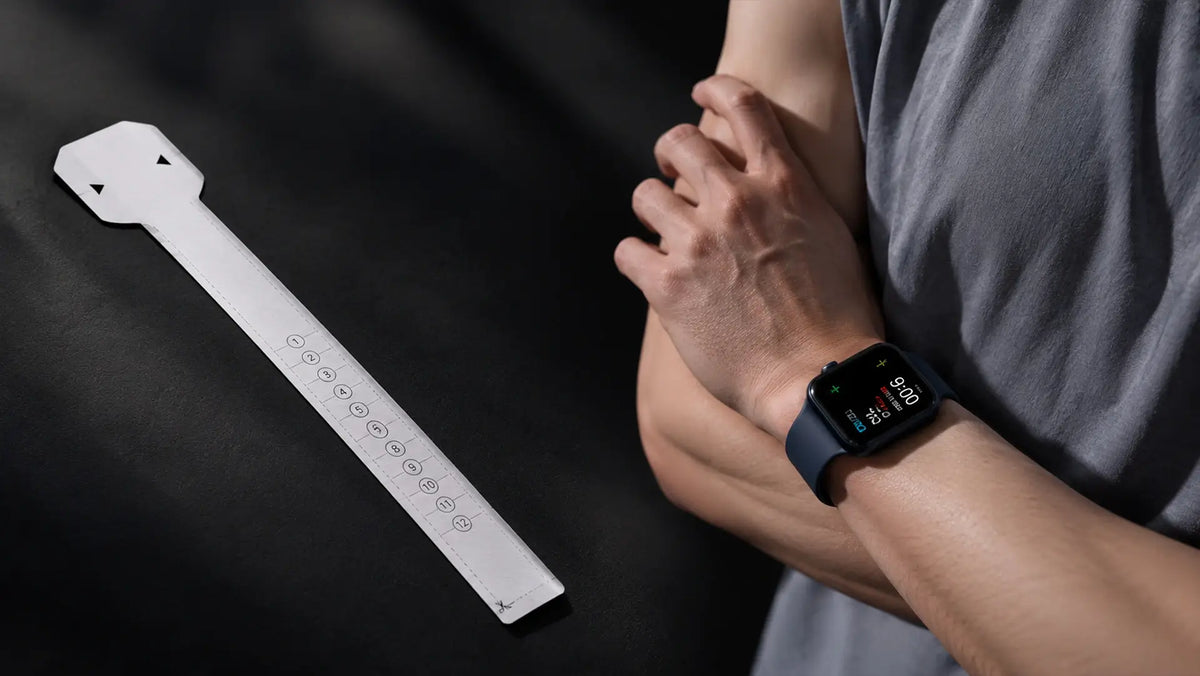
Apple's printable sizing tool uses your wrist measurement to recommend a numbered band size. It works as a starting point, but it can't guarantee a comfortable fit.
An accurate wrist measurement doesn't always translate into the fit you expect.
In a MacRumors discussion, some Apple Watch owners report that the recommended size worked well, while others say their bands felt too loose or too tight. Similar concerns appear in this Reddit discussion.
These are individual experiences, not controlled tests. They don't tell us how often Apple's tool recommends the wrong size or establish that it consistently runs one or two sizes large.
Before choosing a different size based on someone else's experience, make sure your own measurement is correct.
Why Can the Paper Sizing Tool Give the Wrong Size?
Three common measurement issues can affect your result.
Incorrect Print Scaling

Apple's printable sizing guide calls for printing at 100% scale, without using Fit to Page.
Automatic resizing changes the spacing between size marks, even if the printout looks normal.
Before measuring, check the scale using the credit or ID card reference box on the guide.
Loose or Uneven Wrapping
Place the strip where you normally wear your watch, then wrap it snugly enough that it won't slide.
Too loose, and you may get a larger reading. Pull it excessively tight, and the measurement may come out smaller than intended.
Keep the paper flat and steady against your wrist.
Reading Between Size Marks
Apple's printable guide instructs you to choose the smaller number when the arrows point to a line between two sizes.
That rule applies to a boundary reading. It doesn't mean you should go down another size when the tool gives you a clear result.
How to Double-Check Your Solo Loop Size Before Ordering
If you're buying an Apple Solo Loop, follow Apple's current sizing instructions.
For Eclipex One Flex, the Find Your Band Size tool offers two ways to measure: a printable sizing strip or a wrist-measurement calculator. Both are designed specifically for One Flex, not as replacements for Apple's official tool.
Method 1: Use a Printable Sizing Tool

Download the guide that matches your printer paper:
Print at 100% scale and check the reference box before cutting out the strip.
- Cut out the sizing strip.
- Position the wider end where you normally wear your watch. Use tape to hold it in place if needed.
- Wrap the strip snugly around your wrist.
- Read the number indicated by the arrows.
- Measure again to check that you get the same result.
The strip gives you a numbered One Flex size, so there's no need to convert your wrist measurement separately.
Method 2: Measure Your Wrist and Use the Size Calculator
No printer? You can measure your wrist with a flexible measuring tape instead.

Open Find Your Band Size on the One Flex product page and select Everyday items.
If you don't have a measuring tape:
- Wrap a narrow strip of paper snugly around your wrist.
- Mark where the ends overlap.
- Lay the strip flat and measure it with a ruler.
- Enter the measurement in inches or centimeters.
Use the measurement as recorded, without adding extra room or rounding up. The calculator will recommend a One Flex size.
Do the Two Methods Have to Match?
Both methods should produce a consistent size recommendation when used correctly, though they won't necessarily agree every time.
The printable strip gives you a number directly, while the calculator converts your measured wrist circumference.
Matching results are a useful cross-check, but they don't guarantee how the band will feel.
What if Two Sizing Methods Give Different Results?
Don't automatically choose a smaller size when your measurements disagree.
| Situation | What to Do |
|---|---|
| Paper measurements differ | Measure again, keeping the wrist position and wrapping tension consistent. |
| Arrows land on a dividing line | Follow the guide's instruction to choose the smaller number. |
| Paper strip and calculator disagree | Check the print scale, wrist measurement, and units entered. |
| Calculator gives a clear size | Use it as your starting point rather than automatically sizing down. |
| Results remain inconsistent | Ask for product-specific sizing help or try the band. |
Following a boundary rule isn't the same as sizing down from a clear result. If the tool indicates size 7, for example, that doesn't automatically mean you should order size 6.
One Flex's printable tool uses a 0–12 sizing scale, but the band is currently available in sizes 3–11. If your result is 0, 1, 2, or 12, don't force it into the nearest available size.
Instead, email service@eclipex.com with your wrist measurement to ask whether a custom size might be possible. Availability isn't guaranteed.
If you're buying Apple's Solo Loop, follow Apple's current sizing guidance rather than One Flex's product-specific instructions.
Why the Right Size Number May Still Feel Wrong
Wrist circumference alone can't tell you exactly how a band will feel.
Apple's silicone Solo Loop and Braided Solo Loop have different materials and constructions. Even with the same size number, they may not feel identical on your wrist.
Eclipex One Flex, meanwhile, uses a continuous loop of woven 316 stainless steel. Its sizing follows Apple's Solo Loop numbering system, but that doesn't mean the two bands stretch or fit the same way.
Personal preference plays a part, too. Some people like a firmer fit that keeps the watch from moving during activity. Others prefer less pressure during everyday wear.
A consistent measurement helps narrow down the size, but it can't fully account for how you prefer a band to fit.
When Should You Trust the Measurement or Try a Band First?
If you've measured carefully and keep getting the same result, you have a reasonable starting point for choosing your size.
- Trust consistent measurements. Don't automatically go down a size when your results agree.
- Check borderline readings. Follow the instructions for the specific sizing tool.
- Resolve conflicting results. Ask for sizing help or try the band when possible.
- Check the band you're buying. The same size number doesn't guarantee the same fit across different styles.
For One Flex, the One Flex Size Guide explains its sizing options in more detail.
Start with a carefully checked measurement, then follow the sizing guidance for the band you plan to wear. If you're still unsure, trying the band is a better option than guessing another size.
One Less. One Flex.
The Next-Gen Milanese Solo Loop
Shop One FlexShare:
What Size Apple Watch Band Should I Get? A Simple Decision Guide
Apple Watch SE Band Size Guide: SE 1, 2 & 3