

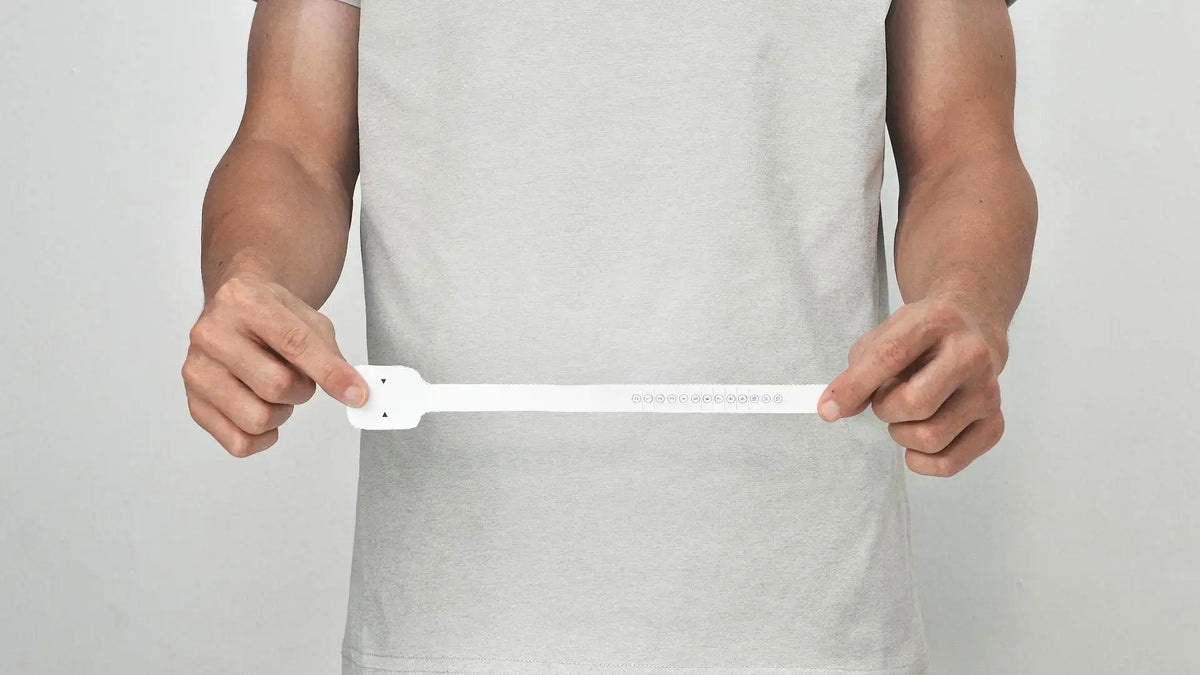
One Flex uses the same numbered sizing as Apple’s Solo Loop. If you already wear an Apple Solo Loop and know your size, the shortcut is simple: choose the same number for One Flex. Apple Solo Loop size 8 means One Flex size 8.
If you don’t know your Solo Loop size, you can measure for One Flex instead. Use the printable sizing tool to read your size directly, or measure your wrist in inches or centimeters and let the One Flex size calculator convert that measurement for you.
One Flex is currently available in sizes 3 through 11.
Already Know Your Apple Solo Loop Size?

If you already wear an Apple Solo Loop, there’s no need to remeasure just to convert the size.
One Flex follows the same numbered Solo Loop sizing for the sizes it offers:
- Apple Solo Loop size 3 → One Flex size 3
- Apple Solo Loop size 7 → One Flex size 7
- Apple Solo Loop size 8 → One Flex size 8
- Apple Solo Loop size 11 → One Flex size 11
In short, your number carries over.
Just don’t confuse your band size with your Apple Watch case size. A case size such as 42mm or 46mm tells you which connector fits your watch. A Solo Loop or One Flex number tells you the size of the loop around your wrist. If you're unsure which sizing method to follow, our Apple Watch band size decision guide explains how to choose based on your watch case, band style, and wrist measurement.
| Number | What it tells you |
|---|---|
| Apple Watch case size | Which band fitting connects to your watch |
| Solo Loop / One Flex size | Which numbered loop size fits your wrist |
| Wrist circumference | The measurement used to find your size if you don’t already know it |
If your Apple Solo Loop size falls between 3 and 11, choose the same number for One Flex.
How to Find Your One Flex Size
If you don’t already know your Solo Loop size, One Flex gives you two ways to find it.
The printable tool gives you a numbered size directly. The everyday-items method starts with your wrist circumference, then the One Flex calculator converts that measurement into a size.
You only need to use one method. If you're comparing results from both methods, our Apple Watch Solo Loop Sizing Guide explains how to check your measurements and what to do when sizing results disagree.
Method 1: Use the Printable One Flex Size Guide
Choose the printable guide that matches your paper format:
- Download US Letter Size Guide — for most U.S. printers.
- Download A4 Size Guide — for Europe and other regions that use A4 paper.
Print the page at 100% scale. Don’t use “Scale to Fit” or another setting that resizes the page. Before cutting out the tool, use the card box on the sheet to confirm that the print scale is correct.
Then:
- Cut out the sizing strip.
- Position the wider end where you normally wear your Apple Watch.
- Wrap the strip snugly around your wrist so it doesn’t slide.
- Read the number indicated by the arrows.
If the arrows land directly on a line between two numbers, choose the smaller one.
The print-scale check matters. Resizing the page changes the physical length of the strip and can change the size you read.
Method 2: Measure Your Wrist With Everyday Items
You can also find your One Flex size without printing anything.
If you have a tailor’s measuring tape, wrap it snugly around your wrist where you normally wear your watch and record the circumference.
If you don’t have a flexible tape:
- Cut a narrow strip of paper.
- Wrap it snugly around your wrist.
- Mark the exact point where the paper overlaps.
- Lay the strip flat against a ruler and measure from the starting edge to the mark.
Enter your measurement into the One Flex size calculator in inches or centimeters. The calculator converts your wrist circumference into the corresponding One Flex size.
Don’t add extra room or round the measurement up. Measure your wrist as it is and let the calculator handle the conversion.
What If You Are Between Two One Flex Sizes?

What you do at the boundary depends on the sizing method you’re using.
With the printable guide, if the arrows land on a line between two numbers, choose the smaller one.
With the wrist-measurement method, enter the actual circumference into the calculator instead of rounding it toward a larger or smaller size.
There’s no need to subtract another size after the tool has already given you a clear result.
What If the Printable Guide Shows Size 0, 1, 2, or 12?
The printable guide uses a 0–12 sizing scale, while One Flex is currently available in sizes 3–11.
That means the tool can return size 0, 1, 2, or 12 even though One Flex isn’t currently produced in those sizes.
If you need size 0, 1, 2, or 12—or your wrist falls outside the current range—email us at service@eclipex.com. Send us your wrist measurement, and we’ll review it and let you know whether a custom One Flex size may be possible. Alternatively, you can check our full small-wrist Apple Watch band guide for more general sizing options across different styles.
The Short Version
There are two sizing paths to remember:
Already wear an Apple Solo Loop?
Choose the same number in One Flex, as long as it falls within the currently available 3–11 range.
Don’t know your Solo Loop size?
Use the One Flex printable guide, or measure your wrist and enter the result into the size calculator.
Your Apple Watch case size determines which band fitting connects to the watch. Your numbered size determines how the One Flex loop fits your wrist.
One Less. One Flex.
The Next-Gen Milanese Solo Loop
Shop One FlexShare:
Best Metal Apple Watch Bands in 2026: Mesh, Link, and Stretch Compared
Titanium vs Stainless Steel Apple Watch Bands: Weight, Cost, and Feel