

To adjust a metal watch band, first identify how its length is controlled. Some bands have adjustable clasps, while others require you to remove links or reposition a mesh closure. Using the wrong method can damage the band or leave its connections loose.
This guide explains how to find the right adjustment method, make the necessary changes, and check that your watch fits securely afterward.
Identify Your Metal Watch Band Before Adjusting It
Examine the underside of your band and its clasp. Look for small adjustment holes, arrows, screw heads, or a sliding closure.
| Band Mechanism | What to Look For | How It's Adjusted |
|---|---|---|
| Clasp micro-adjustment | Small adjustment holes or a built-in adjustment mechanism | Move the adjustment mechanism to fine-tune the fit |
| Removable metal links | Pins, screw heads, or arrows on the underside of the links | Remove or add links to change the length |
| Sliding mesh clasp | A locking plate that moves along the metal mesh | Unlock and reposition the clasp |
| Magnetic mesh closure | A magnetic clasp that fastens at different positions | Change where the magnetic closure fastens |
| Fixed-size stretch loop | A continuous band without an adjustable clasp | Choose the correct loop size rather than adjusting its length |

These mechanisms can overlap. A traditional metal link bracelet, for instance, may have removable links as well as a clasp with micro-adjustment holes. For a broader comparison of these designs, see our guide to different types of metal Apple Watch bands.
If your band has a clasp adjustment, try that first. A small change may be all you need, without removing any links.
If you can't identify the mechanism, don't force a pin, screw, or clasp. Check the manufacturer's instructions before proceeding.
How to Adjust a Metal Watch Band Using the Clasp
If your metal watch band is only slightly too loose or tight, adjusting the clasp may be enough.
Many folding clasps have a row of small holes that hold a spring bar in place. Moving the spring bar between these holes changes the bracelet's effective length in small increments. Other clasps use a button or sliding mechanism, so the procedure depends on your particular design.
Adjusting a Clasp With Micro-Adjustment Holes

For a conventional spring-bar clasp:
- Open the clasp fully. Find the small adjustment holes and the spring bar that connects the bracelet to the clasp.
- Use a spring-bar tool. Carefully compress one end of the spring bar to release it from its current hole.
- Move it one position. Shift the spring bar toward the shorter setting to tighten the band, or toward the longer setting to loosen it. Follow the clasp's layout and the manufacturer's instructions.
- Secure the spring bar. Release it into the new position, making sure both ends are seated properly.
- Try the watch on. Close the clasp and check the fit. If necessary, adjust it again, one position at a time.
Some clasps have tool-free micro-adjustment systems. If yours uses a release button or sliding mechanism, follow the manufacturer's instructions rather than trying to remove a spring bar.
Clasp adjustments are useful for fine-tuning, but they have a limited range. If the bracelet is still too large and has removable links, you may need to take out one or more.
For a manufacturer-specific example, see the Nixon micro-adjustment guide.
How to Resize a Metal Watch Band by Removing Links
If your bracelet is still too loose after adjusting the clasp, removing links may help. The process depends on how the links are connected.
Before Removing Any Links
A little preparation can help you avoid scratches, lost parts, and unnecessary adjustments.
- Identify the removable links. Look for arrows or other markings on the underside. Not every link is meant to be removed.
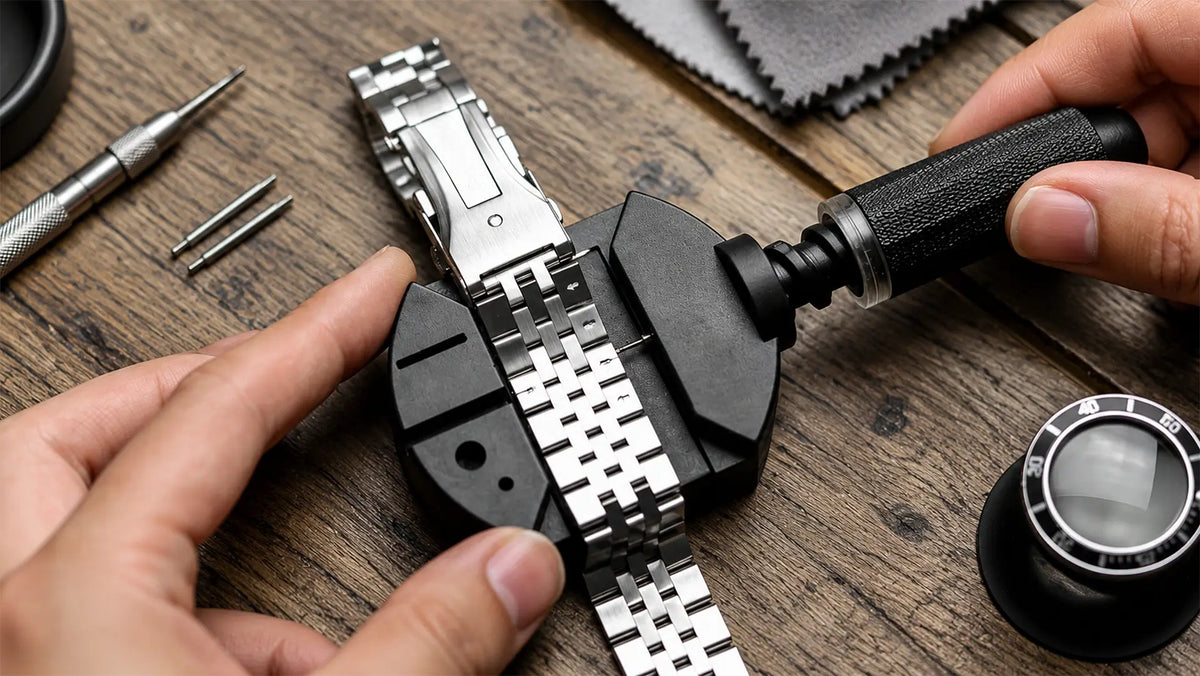
- Get the right tools. Pin-connected bracelets typically need a pin pusher or link removal tool. Screw-connected bracelets require a screwdriver that fits the screw head.
- Protect your work surface. Place the bracelet on a soft cloth or bracelet holder. Keep a small tray nearby for pins, screws, and collars.
- Decide which links to remove. When possible, remove links from both sides of the clasp to keep it reasonably centered under your wrist.
- Make a small adjustment first. Remove fewer links initially, then check the length before taking out more.
If you're unsure how the links are connected, consult the manufacturer's instructions before continuing.
Adjusting Push-Pin and Pin-and-Collar Links

Many metal bracelets use friction-fit pins to connect their links. Some also have a small metal collar that helps hold each pin in place.
For a typical push-pin bracelet:
- Find the arrows on the underside of the removable links, if present.
- Place the bracelet in a holder and align your pin pusher with the pin.
- Carefully push the pin in the indicated direction. If there are no arrows, follow the manufacturer's removal instructions.
- Remove the link or links needed to shorten the band.
- Reconnect the bracelet and reinstall the pin according to its original fastening system.
Pin-and-collar bracelets require extra care. A tiny metal sleeve may come loose when you remove the pin. Keep both pieces together.
When reassembling the bracelet, return the collar to its correct position before securing the pin. Placement varies by design, so follow the manufacturer's instructions rather than assuming every collar fits the same way.
Never leave out a collar just because the pin appears to fit without it.
Adjusting Screw-Connected Links
Some metal bracelets use small screws instead of friction-fit pins. These generally require a precision screwdriver that fits the screw head.
- Identify the removable links and check whether each connection has a single screw or a two-sided assembly.
- Support the bracelet on a stable, protected surface.
- Carefully loosen the screw with the appropriate screwdriver. If the assembly has two sides, you may need to hold the opposite side steady.
- Remove the link, keeping its screws and connecting parts together.
- Reconnect the bracelet and tighten the screws according to the manufacturer's instructions.
Don't use excessive force. A slipping screwdriver can scratch the bracelet or damage the screw head.
After reconnecting the links, make sure every pin, collar, or screw is properly secured before putting the watch back on.
For visual examples, see WatchGecko's metal bracelet adjustment guide.
How to Adjust a Milanese Mesh Watch Band
Milanese mesh bands typically don't have removable links. Adjustable versions change length through a sliding clasp or magnetic closure.
Sliding Clasp Mesh Bands
Many Milanese-style mesh bands have a clasp that locks into place along the woven metal surface.

To adjust a compatible sliding clasp:
- Open the clasp. Find the small locking plate and gently lift it using the tool or method recommended by the manufacturer.
- Move the clasp. Slide it along the mesh to shorten or lengthen the band.
- Align the locking position. If the design has grooves or notches beneath the mesh, line up the clasp with an appropriate position before closing it.
- Secure the clasp. Press the locking plate back into place until it engages.
- Check the closure. Gently test the clasp to make sure it stays in position without slipping.
If the locking plate won't close, don't force it. The clasp may not be aligned with its locking position.
Timex describes a similar process for its sliding-clasp mesh bands, including the need to align the clasp with the grooves underneath before locking it. See the Timex mesh band adjustment instructions.
Magnetic Mesh Bands

Magnetic mesh bands work differently. Instead of unlocking and moving a mechanical clasp, you change the position where the magnetic closure fastens.
For a compatible adjustable magnetic mesh band:
- Open or release the magnetic closure according to its design.
- Wrap the mesh around your wrist and adjust the fastening position until the band sits comfortably.
- Secure the magnet as directed by the manufacturer.
- Check that the closure holds its position during normal wrist movement.
Some magnetic bands loop the mesh back through a connector, while others fasten differently. Follow the instructions for your specific model.
Unlike a sliding clasp, a magnetic closure generally doesn't require you to lift a locking plate with a tool.
Check the Fit and Security After Adjustment
Once you've adjusted the band, put the watch on and check both the fit and the connections.

A metal watch band should stay in place without pressing uncomfortably against your wrist. It shouldn't slide around excessively or restrict movement when you bend your hand.
Check the fit:
- Wrist movement: Bend and rotate your wrist naturally. The band shouldn't pinch, dig into your skin, or limit movement.
- Watch position: The watch should stay reasonably stable rather than sliding freely around your wrist.
- Pressure: If the band feels uncomfortable or leaves deep, persistent marks, it may be too tight.
- Apple Watch sensors: If you wear an Apple Watch, the back should maintain contact with your skin without feeling uncomfortably tight. Apple recommends a snug but comfortable fit, with the watch positioned above the wrist bone. See Apple's official fit guidance.
Check the connections:
If the band still feels too loose or tight, check whether its size is right for your wrist. Our Apple Watch band sizing guide explains how wrist measurements relate to different band sizes.
Inspect any parts you adjusted. Make sure the clasp closes properly, the links are securely connected, and no pins or screws protrude.
If anything feels loose or won't stay secured, don't wear the watch until the problem is fixed.
When You Shouldn't Adjust a Metal Watch Band Yourself
Some metal watch bands need specialized tools or professional attention. Others aren't designed to be adjusted at all.
Stop and seek professional help if:
- You can't identify how the links or clasp are secured.
- A screw is stripped, stuck, or damaged.
- A pin, collar, or other connecting part is missing.
- A link or clasp looks bent, cracked, or unusually loose.
- The bracelet won't lock securely after reassembly.
Forcing a damaged or unfamiliar mechanism can make things worse. A watchmaker or qualified repair professional can determine whether the band can be adjusted or needs replacement parts.
What About Metal Watch Bands Without Adjustable Links or Clasps?

Some metal bands use a continuous stretch-loop design instead of removable links or adjustable closures. Their length is determined by the size you choose, not by an adjustment mechanism.
For example, Eclipex One Flex is a continuous loop of woven 316 stainless steel. It stretches over your hand without a clasp or removable links, so there's nothing to fasten or adjust each time you wear it.
But clasp-free doesn't mean one-size-fits-all. One Flex comes in nine loop sizes, numbered 3–11. You still need to measure your wrist and choose the correct size because the band can't be shortened or tightened after purchase. For help measuring your wrist and choosing a numbered loop size, see our Apple Watch Solo Loop sizing guide.
The key is to work with the band's design, not against it. Adjust what's meant to be adjusted, and choose the correct size when adjustment isn't an option.
One Less. One Flex.
The Next-Gen Milanese Solo Loop
Shop One FlexShare:
How to Clean a Milanese Loop Apple Watch Band (Step by Step)